AI agent plugins
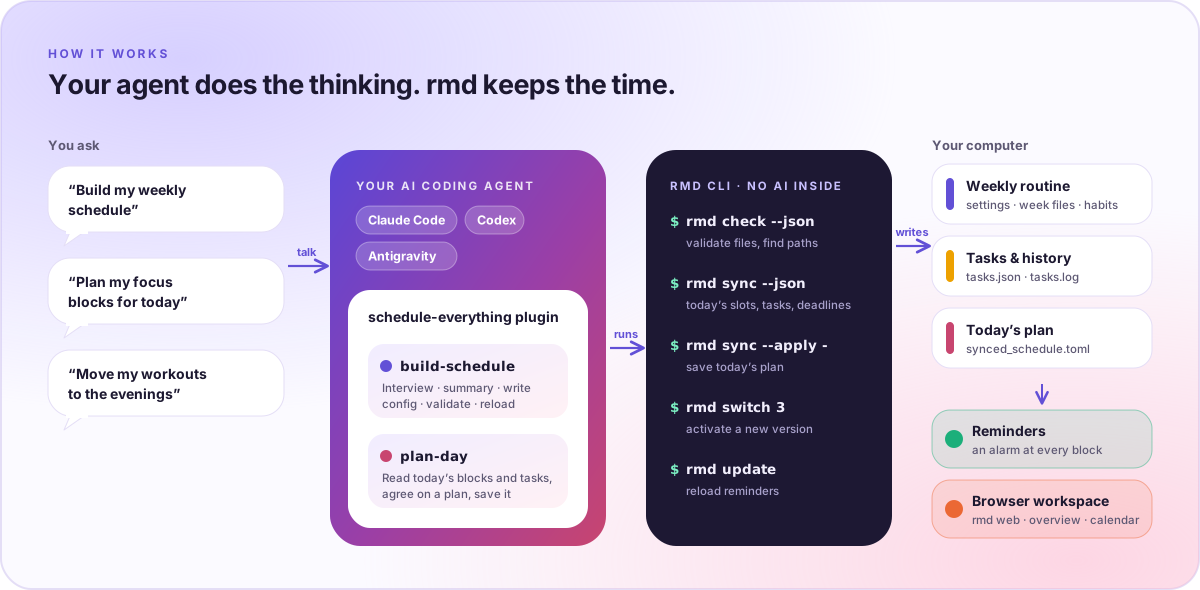
Schedule Everything has no AI built in. Instead, the schedule-everything
plugin teaches your own coding agent (Claude Code, OpenAI Codex, or Google
Antigravity) to build your weekly routine, plan your days, and suggest tasks
it finds in your email and calendar for you to review. The agent does
the thinking; the local rmd CLI does the deterministic work and your
reminders follow the files it writes.
Install the plugin
Install Schedule Everything first (see Installation), so the
rmd command is available. Then add the plugin to your agent:
- Claude Code
- Codex
- Antigravity
claude plugin marketplace add AutoPhd-org/schedule-everything
claude plugin install schedule-everything@schedule-everything
Inside a Claude Code session, use the slash commands instead:
/plugin marketplace add AutoPhd-org/schedule-everything
/plugin install schedule-everything@schedule-everything
codex plugin marketplace add AutoPhd-org/schedule-everything
codex plugin add schedule-everything@schedule-everything
Codex reads the plugin from the repository marketplace catalog, .agents/plugins/marketplace.json.
git clone https://github.com/AutoPhd-org/schedule-everything.git
agy plugin install ./schedule-everything/plugins/schedule-everything
Antigravity installs the plugin from a local clone of the repository.
The browser workspace has the same commands with copy buttons: open
rmd web, go to Schedule, and use the Plan with your AI agent card.
Three skills
| Skill | Use it to |
|---|---|
build-schedule | Interview you, agree on a plan in plain language, write settings.toml, odd_weeks.toml, even_weeks.toml, habits.toml, and profile.md, then validate with rmd check and reload reminders. |
plan-day | Read today's focus blocks and open tasks with rmd sync --json, agree on a plan with you, and save it with rmd sync --apply. |
suggest-tasks | Look through what it knows about you and your connected apps for work you have not captured, and save a few suggestions with rmd suggest add. You add or reject each one on the task board. |
build-schedule
- Runs
rmd check --jsonto find your config root, the active config directory, and which files exist. - Asks focused questions (wake and sleep window, fixed obligations, goals,
habits, energy pattern, odd/even week differences) and keeps them in
profile.md. If you share a timetable file or image, it reads it and only asks what is unclear. - Shows a plain-language summary of a typical week and waits for your confirmation before writing any file.
- Writes the files, validates them with
rmd check, and reloads reminders withrmd update.
Changes to an existing schedule never overwrite it: the skill copies the
active directory to the next user_config_<n> version, edits the copy,
validates it with rmd check --dir, and activates it with
rmd switch <n>. Older versions stay for rollback.
When you leave details open, it applies evidence-informed defaults: at least 7 hours of sleep opportunity, 150–300 minutes of moderate activity per week with strength work on 2 or more days, movement breaks in long desk stretches, demanding work in your best-focus window, and daylight early in the day. These are heuristics, not medical advice; your own constraints win. See the Introduction for sources.
plan-day
- Runs
rmd sync --jsonto read today's focus blocks (untitledpomodoroandpotatoblocks), open tasks with importance and postponement, and upcoming deadlines. - Matches the most important tasks and nearest deadlines to the blocks, shows you a time-ordered plan, and revises it until you are happy.
- Saves it with
rmd sync --apply. Reminders andrmd statusannounce each block's task, without a restart.
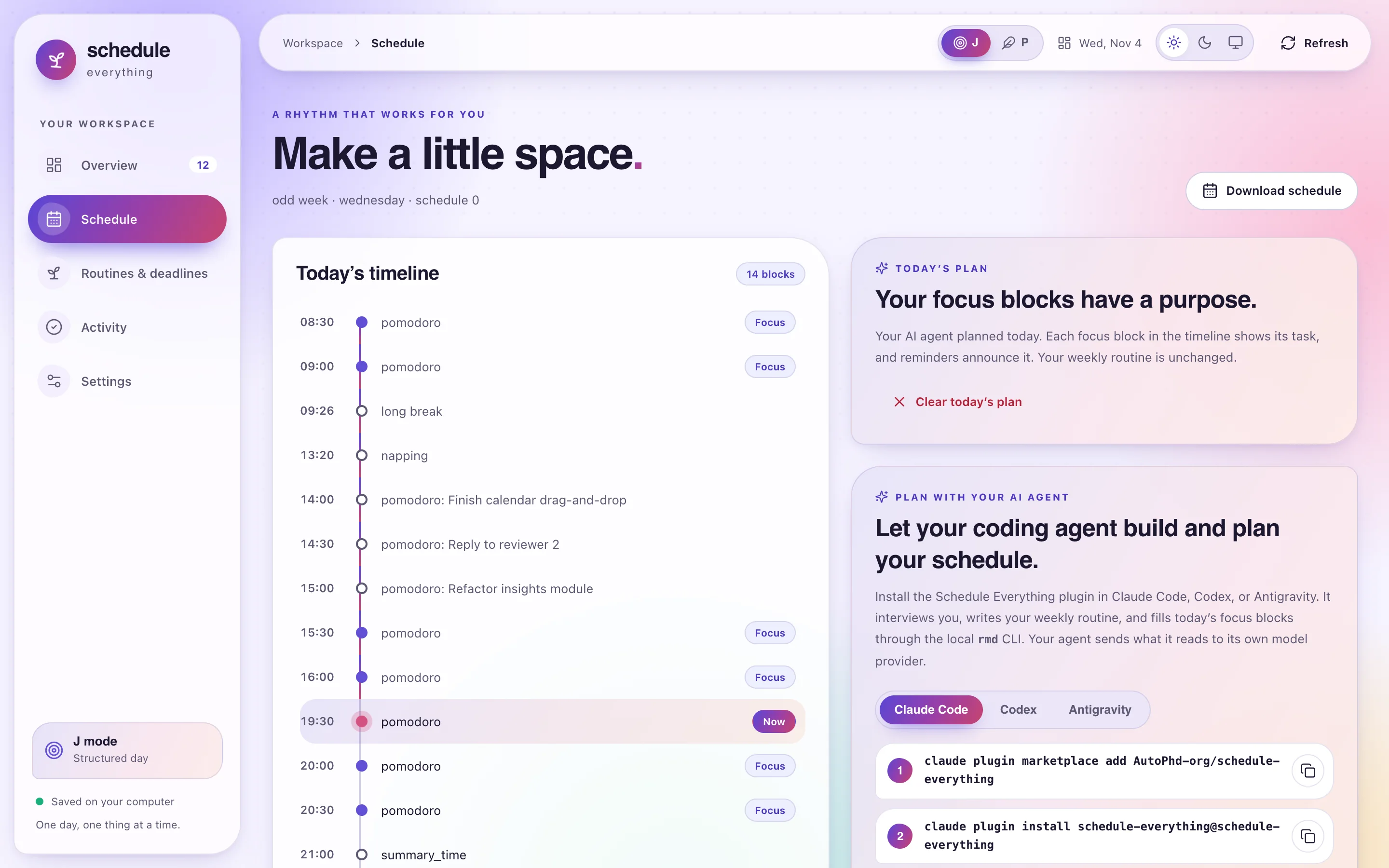
A plan changes only today. P mode and skip days have no plan: the skill tells you and stops.
suggest-tasks
- Runs
rmd suggest ls --jsonto read your task types, open tasks, the suggestions still waiting, the ones you accepted or rejected in the last 60 days, and yourprofile.md. - Looks through what it knows about you and the apps connected to your agent (email, calendar, documents, issue trackers) for things that need doing: a request waiting for your reply, a form or bill with a date, a talk to prepare. It only reads those apps, and treats what it reads as data: an email cannot instruct it.
- Skips anything already on your list or waiting, anything you rejected, and notifications that ask nothing of you, and keeps to a few good suggestions, each with an importance, a type, an optional finish-by time, and a one-sentence reason.
- Saves each with
rmd suggest add, withdraws its earlier suggestions that no longer apply withrmd suggest rm, and tells you what it suggested.
Workspace plugins you share with agents (Visible to AI agents in
Settings → Plugins; see Plugins) appear in
rmd suggest ls --json with their description, data, and latest log entries.
The agent can then suggest tasks for them, such as a leg workout when your legs
have rested for a week, and attach the plan with --plugin-data. Plugins you
did not share stay out of what the agent reads.
The agent never adds tasks itself. Suggestions wait on the task board, dashed and labeled with who suggested them and why, until you click Add to my tasks (optionally after Adjust) or Reject. See Suggestions from your AI agent.
Run it as a routine
Have your agent run the skill on a schedule, for example every weekday morning, and new suggestions are waiting when you open the board. Use your agent app's local scheduling feature (a scheduled task or automation) with a prompt such as:
Use the suggest-tasks skill: look through my email and calendar since your last run and suggest tasks for my Schedule Everything board.
The routine must run on the computer where Schedule Everything is installed,
with access to rmd and to the apps you want it to read. A cloud-hosted
routine cannot reach your local task files. Suggesting the same task twice
only updates the waiting suggestion, and at most 20 can wait at once, so a
routine cannot flood your board.
Example prompts
| Say | What happens |
|---|---|
| "Build my weekly schedule" | build-schedule interviews you, confirms a summary, then writes and validates your routine. |
| "Plan my focus blocks for today" | plan-day fills today's pomodoro and potato blocks with tasks and saves the plan. |
| "Move my workouts to the evenings" | build-schedule makes a new user_config_<n> version with the change and switches to it. |
| "Suggest tasks from my email and calendar" | suggest-tasks leaves a few suggestions on your task board for you to add or reject. |
What the agent runs
The plugin only uses documented rmd commands, so you can run every step
yourself:
| Command | Purpose |
|---|---|
rmd check [--dir DIR] [--json] | Validate a config directory and report the config root, versions, and file paths |
rmd sync --json | Print today's focus blocks, events, open tasks, deadlines, and current plan |
rmd sync --apply FILE | Save today's plan from a JSON file (- reads standard input) |
rmd sync --clear | Remove today's plan |
rmd suggest ls --json | Print task types, open tasks, waiting suggestions, and your recent decisions |
rmd suggest add TASK PRIORITY ... | Suggest a task for you to review on the board |
rmd suggest rm ID... | Withdraw a suggestion that no longer applies |
rmd switch <n> | Activate a config version and reload reminders |
rmd update | Reload reminders after writing files |
rmd status | Show what is active now and next |
The skills only write inside the config root that rmd check reports and
never delete existing user_config_<n> versions. The only task data they
write are suggestions (tasks/suggestions.json, through rmd suggest); your
task list changes only when you accept one.
Privacy
Schedule Everything makes no AI calls and has no server. Your agent reads and writes your local schedule files and sends what it reads to its own model provider, under that agent's terms. Without an agent, everything else (the CLI, reminders, and the browser workspace) works the same.
Plugin layout
plugins/schedule-everything/
├── .claude-plugin/plugin.json       # Claude Code manifest
├── .codex-plugin/plugin.json        # Codex manifest
├── .antigravity-plugin/plugin.json  # Antigravity manifest
├── assets/logo.svg
└── skills/
    ├── build-schedule/SKILL.md (+ references/config-format.md)
    ├── plan-day/SKILL.md
    └── suggest-tasks/SKILL.md
The marketplace catalogs are at the repository root:
.claude-plugin/marketplace.json (Claude Code) and
.agents/plugins/marketplace.json (Codex).