Introduction
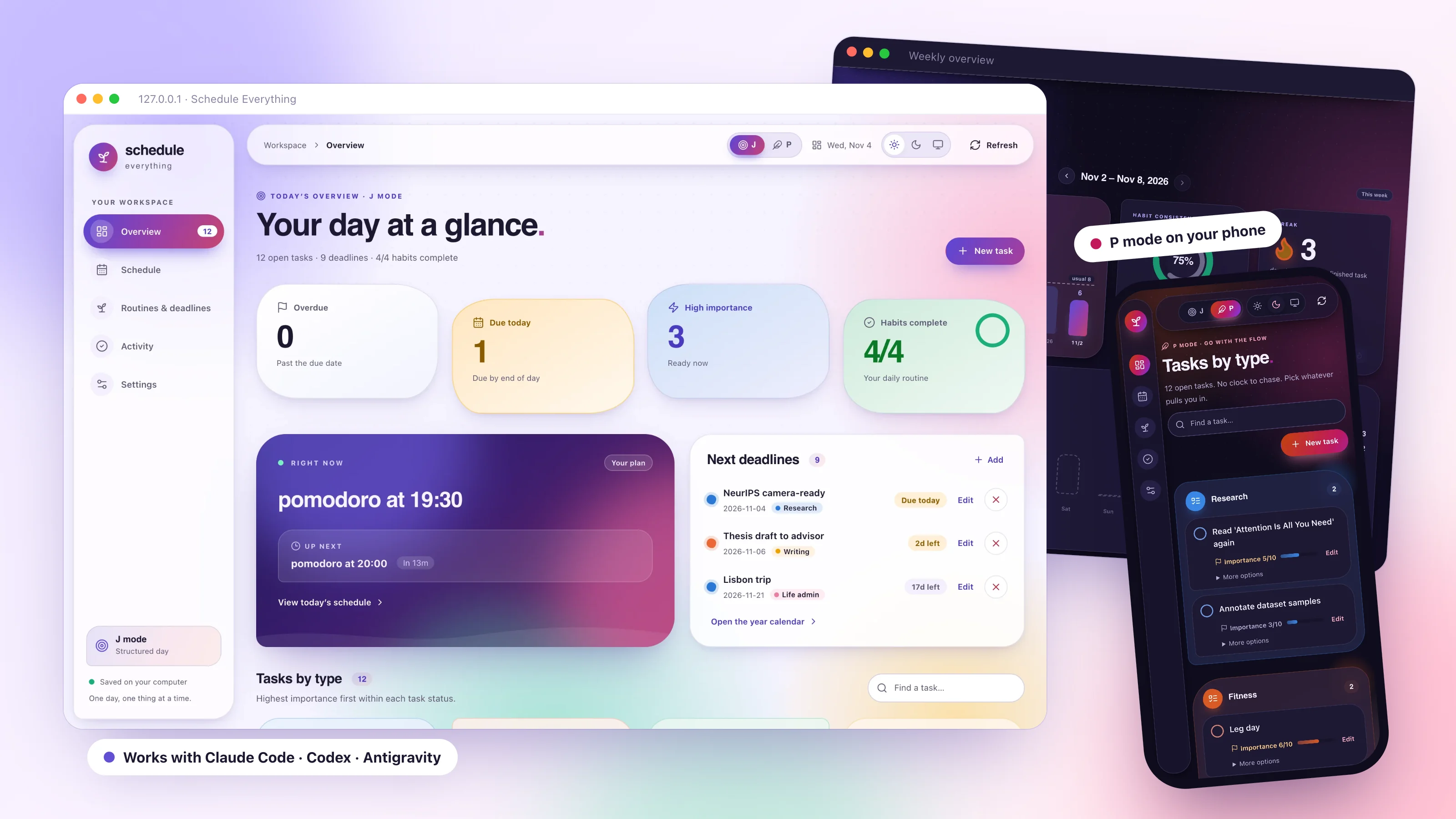
Schedule Everything (晨钟暮鼓) is a local-first scheduling tool for healthy
habits, deep work, and consistent routines. Your weekly routine lives in plain
TOML files; a background service sounds an alarm and keeps a dialog up at the
start and end of every block until you respond. Tasks, deadlines, and habits
sit alongside it in the rmd CLI and a local browser workspace.
You build the routine with your own AI coding agent (Claude Code, OpenAI
Codex, or Google Antigravity) through the schedule-everything
plugin. Its build-schedule skill interviews you, confirms a
plain-language summary, and writes the files; plan-day fills today's focus
blocks with real tasks. Schedule Everything itself makes no AI calls.
How it works
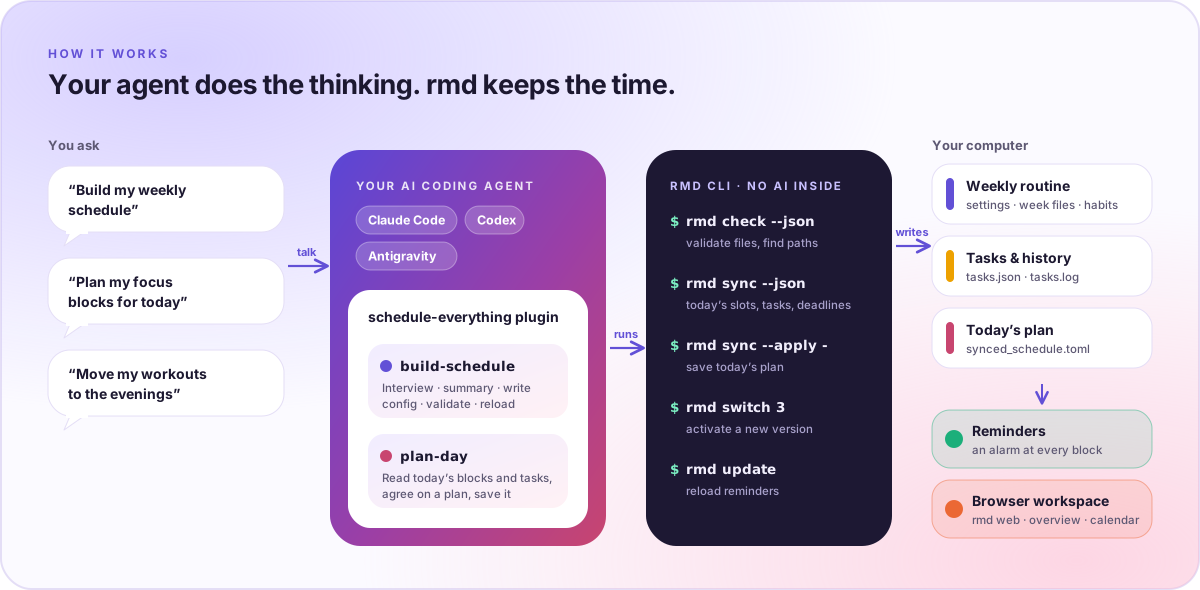
- You ask your agent in plain words, for example "Build my weekly schedule".
- The plugin runs
rmd:rmd checkvalidates your files and reports their paths,rmd sync --jsondescribes today's focus blocks and open tasks, andrmd sync --applysaves today's plan. - Your files drive everything: the reminder service checks the schedule
every minute and alerts with a sound and a dialog;
rmd webshows the same data in the browser.
The daily rhythm
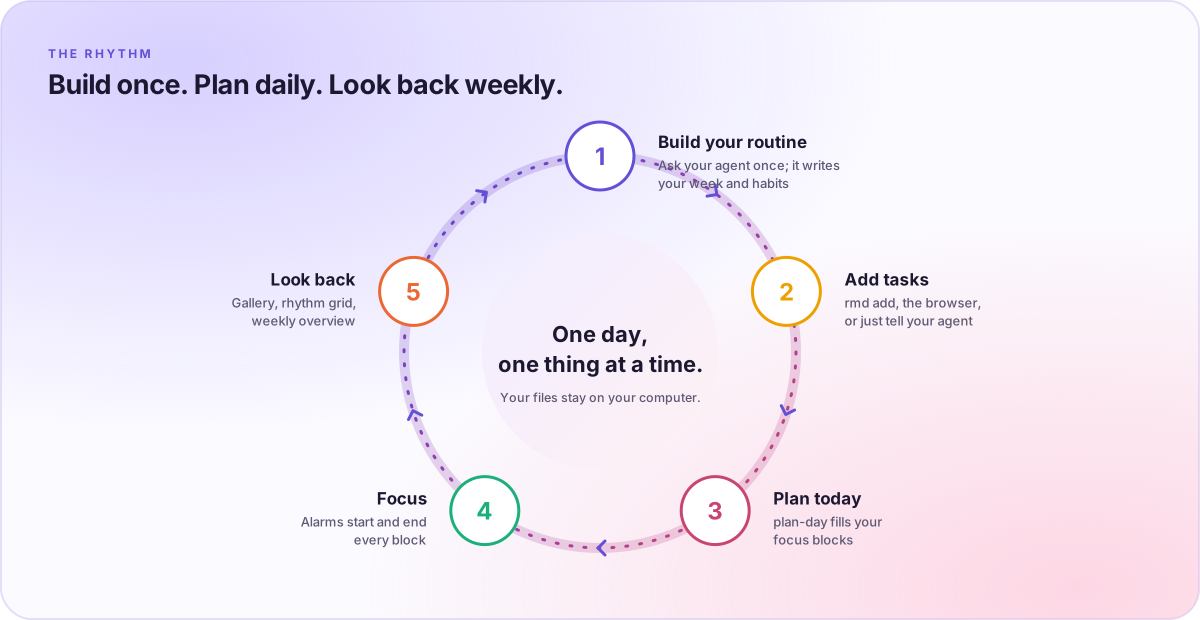
Build your routine once, add tasks as they come (rmd add "Draft intro" 8),
plan today's focus blocks with your agent, let the reminders keep you on
track, and look back in the Activity gallery and the weekly overview.
Philosophy
In an era of complex, cloud-based productivity suites, Schedule Everything takes a different approach: simplicity, privacy, and control. Your schedule should be:
- Owned by you: stored locally, not on a remote server.
- Versioned: treated like code, with history and diffs.
- Distraction-free: running quietly in the background, alerting you only when necessary.
- Programmable: configured with simple text files that agents and scripts can edit.
Core capabilities
- Declarative configuration: define your week in TOML. Reusable
[time_blocks](with start and end alarms) and[time_points](single reminders) live insettings.toml;[common]entries apply to every day. - Persistent alerts: an audible cue plus a dialog that repeats until you respond.
- Odd/even weeks: alternates between
odd_weeks.tomlandeven_weeks.tomlby ISO week number, for alternating timetables. - Tasks, deadlines, habits: importance 1–10, task types, postponement, deadline urgency, and daily habit check-ins.
- J mode and P mode: a structured day or a flexible, task-first day.
- Browser workspace:
rmd webopens a local overview, timeline, year calendar, activity gallery, and weekly overview. See Browser workspace. - System integration: runs as a background service (
launchdon macOS, asystemduser service on Linux) that survives reboots.
Evidence-informed defaults
When the build-schedule skill has to fill gaps, it applies general,
population-level defaults informed by sleep, movement, sedentary-behavior, and
light-exposure research:
- protect at least 7 hours of sleep opportunity with consistent sleep and wake times
- avoid trading sleep for work when other options exist
- spread about 150–300 minutes of moderate activity across the week, with strength work on 2 or more days when feasible
- insert movement or recovery breaks during long desk-based work stretches
- place demanding cognitive work in the user's best-focus windows
- prefer daylight earlier in the day and avoid stimulating late-night work
These are heuristics rather than medical advice. Real user constraints, medical instructions, disability needs, or shift-work realities take priority.
Selected sources:
- Watson et al., Recommended Amount of Sleep for a Healthy Adult (AASM PDF)
- Sletten et al., The importance of sleep regularity (DOI)
- WHO, Physical activity recommendations for adults (WHO)
- Albulescu et al., "Give me a break!" (PLOS ONE)
- Figueiro et al., The impact of daytime light exposures on sleep and mood in office workers (DOI)
Why TOML?
Human-centric syntax
TOML is designed to be read and written by people. It avoids the bracket noise of JSON and the indentation ambiguity of YAML.
Infrastructure as code
Your schedule is configuration. Stored in text files, it can be put under version control, synced across machines with standard tools (rsync, git, Dropbox), and diffed to see exactly what changed.
Composable logic
Define a pomodoro block once in settings.toml and reference it everywhere.
Changing your focus length from 25 to 50 minutes is a one-line edit.
AI-ready
Text configuration is the native language of coding agents. Hand your agent a
timetable, a screenshot, or a description of your week; the build-schedule
skill turns it into valid TOML and checks it with rmd check before it goes
live.
Getting started
- Installation: set up the CLI and the background service.
- Quick start: get a working schedule in minutes.
- AI agent plugins: let your agent build and plan for you.